
[et_pb_section fb_built=”1″ disabled_on=”on|on|on” admin_label=”OG” _builder_version=”4.16″ disabled=”on” collapsed=”on” global_colors_info=”{}”][et_pb_row _builder_version=”4.16″ background_size=”initial” background_position=”top_left” background_repeat=”repeat” global_colors_info=”{}”][et_pb_column type=”4_4″ _builder_version=”4.16″ custom_padding=”|||” global_colors_info=”{}” custom_padding__hover=”|||”][et_pb_text _builder_version=”4.16″ background_size=”initial” background_position=”top_left” background_repeat=”repeat” global_colors_info=”{}”]

Wireless. Effortless. Magical.
 Just take them out and they’re ready to use with all your devices. Put them in your ears and they connect instantly. Speak into them and your voice sounds clear. Arguably one of the easiest, most sleek, straight forward, wireless headphones on the market. AirPods provide rich, high-quality AAC audio.
Deciding the Best EQ Setting for AirPods
Every song will produce different results based on quality, therefor it is nice to achieve the best sound quality with the least amount of searching through the Apple settings. Currently, I have my EQ set to jazz, and the results greatly improve the vocal clarity and provide a modest amount of surround sound bass.
Based on preferences you may want to choose a setting with more depth or less bass. Play around and test different songs and settings. Over time you will find the one that fits your best needs and desires.
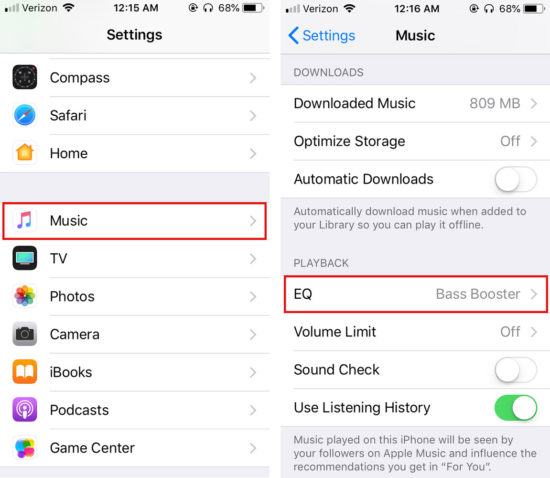
How to Navigate to EQ Settings Apple iOS
- Open Settings from iPhone Home Screen
- Select the Music Option
- Tap EQ from the Playback section
- Test the 24 Apple Equalizer Settings to find the one you prefer
- Equalization will persist as long as your Bluetooth Devices are connected. To change or disable it, visit Settings > Music > EQ and tap Off.
Out of the Box
- Big bass, but not as overwhelming as the EarPods
- Clear low-end
- Clear highs, no sibilance or harshness
What EQ Setting Do You Use on Your iPhone?
Let us know what you think. We would like to get your input on what you believe the overall, most consistent, and overall best equalizer setting.
[/et_pb_text][/et_pb_column][/et_pb_row][/et_pb_section][et_pb_section fb_built=”1″ custom_padding_last_edited=”on|desktop” admin_label=”Intro” _builder_version=”4.16″ _module_preset=”default” custom_padding=”25px||0px||false|false” custom_padding_tablet=”||0px||false|false” custom_padding_phone=”||0px||false|false” collapsed=”off” global_colors_info=”{}”][et_pb_row column_structure=”1_2,1_2″ _builder_version=”4.16″ _module_preset=”default” custom_padding=”||0px|||” locked=”off” global_colors_info=”{}”][et_pb_column type=”1_2″ _builder_version=”4.16″ _module_preset=”default” global_colors_info=”{}”][et_pb_text _builder_version=”4.16″ _module_preset=”default” header_font=”Poppins|800||on|||||” header_text_color=”#516879″ header_font_size=”40px” header_letter_spacing=”1px” header_line_height=”1.2em” header_2_font=”Bebas Neue||||||||” header_2_font_size=”80px” custom_margin=”||10px||false|false” header_2_font_size_tablet=”42px” header_2_font_size_phone=”30px” header_2_font_size_last_edited=”on|phone” header_2_line_height_tablet=”1.2em” header_2_line_height_phone=”1.2em” header_2_line_height_last_edited=”on|tablet” locked=”off” global_colors_info=”{}”]
Best EQ Settings for Apple AirPods
[/et_pb_text][/et_pb_column][et_pb_column type=”1_2″ _builder_version=”4.16″ _module_preset=”default” global_colors_info=”{}”][et_pb_divider color=”#007cba” divider_weight=”60px” _builder_version=”4.16″ _module_preset=”default” height=”60px” global_colors_info=”{}”][/et_pb_divider][/et_pb_column][/et_pb_row][et_pb_row column_structure=”1_2,1_2″ _builder_version=”4.16″ _module_preset=”default” global_colors_info=”{}”][et_pb_column type=”1_2″ _builder_version=”4.16″ _module_preset=”default” global_colors_info=”{}”][et_pb_text _builder_version=”4.16″ _module_preset=”default” text_font_size=”16px” text_line_height=”1.8em” text_font_size_tablet=”” text_font_size_phone=”14px” text_font_size_last_edited=”on|phone” global_colors_info=”{}”]
As your music shuffles, you will notice that every song produces a different sound based on the overall recording quality and original intent. To achieve the best overall sound quality, without getting lost searching through the Apple settings, we recommend sampling the different EQ settings provided by apple that produce the best sound for YOU! Currently, I have my EQ set to jazz, and the results greatly improve the vocal clarity and provide a modest amount of surround sound bass.
Based on your own preferences, you may want to choose a setting with more depth or less bass. Play around and test different songs and settings. Over time you will find the one that fits your best needs and desires.
[/et_pb_text][/et_pb_column][et_pb_column type=”1_2″ _builder_version=”4.16″ _module_preset=”default” global_colors_info=”{}”][et_pb_image src=”https://upnorthproductions.com/wp-content/uploads/2018/06/Apple-AirPods.jpg” title_text=”Apple-AirPods” _builder_version=”4.20.0″ _module_preset=”default” global_colors_info=”{}”][/et_pb_image][/et_pb_column][/et_pb_row][/et_pb_section][et_pb_section fb_built=”1″ custom_padding_last_edited=”on|desktop” admin_label=”Summary” _builder_version=”4.16″ _module_preset=”default” custom_padding=”0px||0px||false|false” custom_padding_tablet=”0px||0px||false|false” custom_padding_phone=”0px||0px||false|false” collapsed=”off” global_colors_info=”{}”][et_pb_row _builder_version=”4.16″ _module_preset=”default” global_colors_info=”{}”][et_pb_column type=”4_4″ _builder_version=”4.16″ _module_preset=”default” global_colors_info=”{}”][et_pb_text admin_label=”Wireless. Effortless. Magical.” _builder_version=”4.16″ _module_preset=”default” header_font=”Bebas Neue||||||||” header_font_size=”70px” header_2_font=”Poppins|800||on|||||” header_2_text_align=”left” header_2_text_color=”#516879″ header_2_font_size=”40px” header_2_letter_spacing=”1px” header_2_line_height=”1.2em” custom_margin=”||10px||false|false” header_2_font_size_tablet=”42px” header_2_font_size_phone=”30px” header_2_font_size_last_edited=”on|phone” header_2_line_height_tablet=”1.2em” header_2_line_height_phone=”1.2em” header_2_line_height_last_edited=”on|tablet” locked=”off” global_colors_info=”{}”]
Wireless. Effortless. Magical.
[/et_pb_text][et_pb_text _builder_version=”4.16″ _module_preset=”default” text_font_size=”16px” text_line_height=”1.8em” text_font_size_tablet=”” text_font_size_phone=”14px” text_font_size_last_edited=”on|phone” global_colors_info=”{}”]
Just take them out and they’re ready to use with all your devices. Put them in your ears and they connect instantly. Speak into them and your voice sounds clear. Arguably one of the easiest, most sleek, straight forward, wireless headphones on the market. AirPods provide rich, high-quality AAC audio.
[/et_pb_text][et_pb_text admin_label=”Out of the Box” _builder_version=”4.16″ _module_preset=”default” header_font=”Bebas Neue||||||||” header_font_size=”70px” header_2_font=”Poppins|800||on|||||” header_2_text_color=”#516879″ header_2_font_size=”40px” header_2_letter_spacing=”1px” header_2_line_height=”1.2em” custom_margin=”||10px||false|false” custom_padding=”24px||||false|false” header_2_font_size_tablet=”42px” header_2_font_size_phone=”30px” header_2_font_size_last_edited=”on|phone” header_2_line_height_tablet=”1.2em” header_2_line_height_phone=”1.2em” header_2_line_height_last_edited=”on|tablet” locked=”off” global_colors_info=”{}”]
Out of the Box
[/et_pb_text][et_pb_text _builder_version=”4.16″ _module_preset=”default” global_colors_info=”{}”]
- Big bass, but not as overwhelming as the EarPods
- Clear low-end
- Clear highs, no sibilance or harshness
[/et_pb_text][/et_pb_column][/et_pb_row][et_pb_row column_structure=”1_2,1_2″ _builder_version=”4.16″ _module_preset=”default” custom_padding=”||||false|false” locked=”off” global_colors_info=”{}”][et_pb_column type=”1_2″ _builder_version=”4.16″ _module_preset=”default” global_colors_info=”{}”][et_pb_text admin_label=”How to Navigate to EQ Settings on Apple iOS” _builder_version=”4.16″ _module_preset=”default” header_font=”Bebas Neue||||||||” header_font_size=”70px” header_2_font=”Poppins|800||on|||||” header_2_text_color=”#516879″ header_2_font_size=”40px” header_2_letter_spacing=”1px” header_2_line_height=”1.2em” custom_margin=”||10px||false|false” header_2_font_size_tablet=”42px” header_2_font_size_phone=”30px” header_2_font_size_last_edited=”on|phone” header_2_line_height_tablet=”1.2em” header_2_line_height_phone=”1.2em” header_2_line_height_last_edited=”on|tablet” locked=”off” global_colors_info=”{}”]
How to Navigate to EQ Settings on Apple iOS
[/et_pb_text][et_pb_text _builder_version=”4.16″ _module_preset=”default” text_font_size=”16px” text_line_height=”1.8em” text_font_size_tablet=”” text_font_size_phone=”14px” text_font_size_last_edited=”on|phone” global_colors_info=”{}”]
- Open Settings from iPhone Home Screen
- Select the Music Option
- Tap EQ from the Playback section
- Test the 24 Apple Equalizer Settings to find the one you prefer
- Equalization will persist as long as your Bluetooth Devices are connected. To change or disable it, visit Settings > Music > EQ and tap Off.
[/et_pb_text][/et_pb_column][et_pb_column type=”1_2″ _builder_version=”4.16″ _module_preset=”default” global_colors_info=”{}”][et_pb_image src=”https://upnorthproductions.com/wp-content/uploads/2018/06/EQ-Settings-Apple-iOS.jpg” alt=”Navigate to EQ Settings Apple iOS” title_text=”EQ-Settings-Apple-iOS” _builder_version=”4.16″ _module_preset=”default” global_colors_info=”{}”][/et_pb_image][/et_pb_column][/et_pb_row][et_pb_row _builder_version=”4.16″ _module_preset=”default” global_colors_info=”{}”][et_pb_column type=”4_4″ _builder_version=”4.16″ _module_preset=”default” global_colors_info=”{}”][et_pb_text admin_label=”What EQ Setting Do You Use on Your iPhone?” _builder_version=”4.16″ _module_preset=”default” header_font=”Bebas Neue||||||||” header_font_size=”70px” header_2_font=”Poppins|800||on|||||” header_2_text_color=”#516879″ header_2_font_size=”40px” header_2_letter_spacing=”1px” header_2_line_height=”1.2em” custom_margin=”||10px||false|false” header_2_font_size_tablet=”42px” header_2_font_size_phone=”30px” header_2_font_size_last_edited=”on|phone” header_2_line_height_tablet=”1.2em” header_2_line_height_phone=”1.2em” header_2_line_height_last_edited=”on|tablet” locked=”off” global_colors_info=”{}”]
What EQ Setting Do You Use on Your iPhone?
[/et_pb_text][et_pb_text _builder_version=”4.16″ _module_preset=”default” text_font_size=”16px” text_line_height=”1.8em” text_font_size_tablet=”” text_font_size_phone=”14px” text_font_size_last_edited=”on|phone” global_colors_info=”{}”]
Let us know what you think. What did you find that worked well for you? We would like to get your input on what you believe the overall, most consistent, and overall best equalizer setting is for the Apple Airpods!
[/et_pb_text][/et_pb_column][/et_pb_row][/et_pb_section][et_pb_section fb_built=”1″ custom_padding_last_edited=”on|desktop” disabled_on=”off|off|off” admin_label=”FAQ” _builder_version=”4.16″ _module_preset=”default” custom_padding=”25px||25px||false|false” custom_padding_tablet=”0px||0px||false|false” custom_padding_phone=”0px||0px||false|false” collapsed=”off” global_colors_info=”{}”][et_pb_row column_structure=”2_5,3_5″ _builder_version=”4.16″ _module_preset=”default” global_colors_info=”{}”][et_pb_column type=”2_5″ _builder_version=”4.16″ _module_preset=”default” global_colors_info=”{}”][et_pb_text admin_label=”Text” _builder_version=”4.20.0″ _module_preset=”default” header_2_font=”Poppins|800||on|||||” header_2_text_color=”#516879″ header_2_font_size=”40px” header_2_letter_spacing=”1px” header_2_line_height=”1.2em” custom_margin_phone=”|||-20px|false|false” custom_margin_last_edited=”off|tablet” custom_padding_tablet=”” custom_padding_phone=”|||20px|false|false” custom_padding_last_edited=”on|phone” header_2_font_size_tablet=”42px” header_2_font_size_phone=”30px” header_2_font_size_last_edited=”on|phone” header_2_line_height_tablet=”1.2em” header_2_line_height_phone=”” header_2_line_height_last_edited=”on|tablet” box_shadow_style=”preset4″ box_shadow_horizontal=”-420px” box_shadow_vertical=”0px” box_shadow_color=”#007cba” box_shadow_horizontal_tablet=”-83vw” box_shadow_horizontal_phone=”” box_shadow_horizontal_last_edited=”on|desktop” locked=”off” global_colors_info=”{}”]
Freequently Asked Questions
[/et_pb_text][/et_pb_column][et_pb_column type=”3_5″ _builder_version=”4.16″ _module_preset=”default” global_colors_info=”{}”][et_pb_accordion open_toggle_text_color=”#516879″ open_toggle_background_color=”rgba(0,0,0,0)” closed_toggle_text_color=”#516879″ closed_toggle_background_color=”rgba(0,0,0,0)” icon_color=”#007cba” _builder_version=”4.20.0″ _module_preset=”default” toggle_text_color=”#516879″ toggle_font=”||||||||” toggle_font_size=”24px” toggle_line_height=”1.2em” body_line_height=”1.8em” toggle_font_size_tablet=”20px” toggle_font_size_phone=”18px” toggle_font_size_last_edited=”on|phone” body_font_size_tablet=”” body_font_size_phone=”14px” body_font_size_last_edited=”on|phone” border_width_all=”0px” border_width_bottom=”1px” border_color_bottom=”#e6e6e6″ global_colors_info=”{}”][et_pb_accordion_item title=”How Do I reset my AirPods?” open=”on” _builder_version=”4.16″ _module_preset=”default” custom_margin=”||0px||false|false” custom_padding=”|0px||0px|false|true” global_colors_info=”{}”]
With the AirPods inserted in the case, open the lid open, press and hold the button on the back of the case for 15 seconds, or until you see the status light flashing amber.
[/et_pb_accordion_item][et_pb_accordion_item title=”Why do I sound far away with AirPods?” _builder_version=”4.16″ _module_preset=”default” custom_margin=”||0px||false|false” custom_padding=”|0px||0px|false|true” global_colors_info=”{}” open=”off”]
A common cause of muffled sound in your AirPods is most likely caused from dirty speakers. Since they are directly inserted your ear canal, earwax and other material can build up over time, which can reduce the sound quality.
[/et_pb_accordion_item][/et_pb_accordion][/et_pb_column][/et_pb_row][et_pb_row _builder_version=”4.20.0″ _module_preset=”default”][et_pb_column _builder_version=”4.20.0″ _module_preset=”default” type=”4_4″][et_pb_text _builder_version=”4.20.0″ _module_preset=”default” hover_enabled=”0″ sticky_enabled=”0″]
[/et_pb_text][/et_pb_column][/et_pb_row][/et_pb_section]
I just heard the Apple news! New Airpod Pro! I’m definitely going to pick some up for my iPhone.
Great advice, just what i needed for my airpods. Now they sound great!